- You have no items in your shopping cart
- Continue Shopping

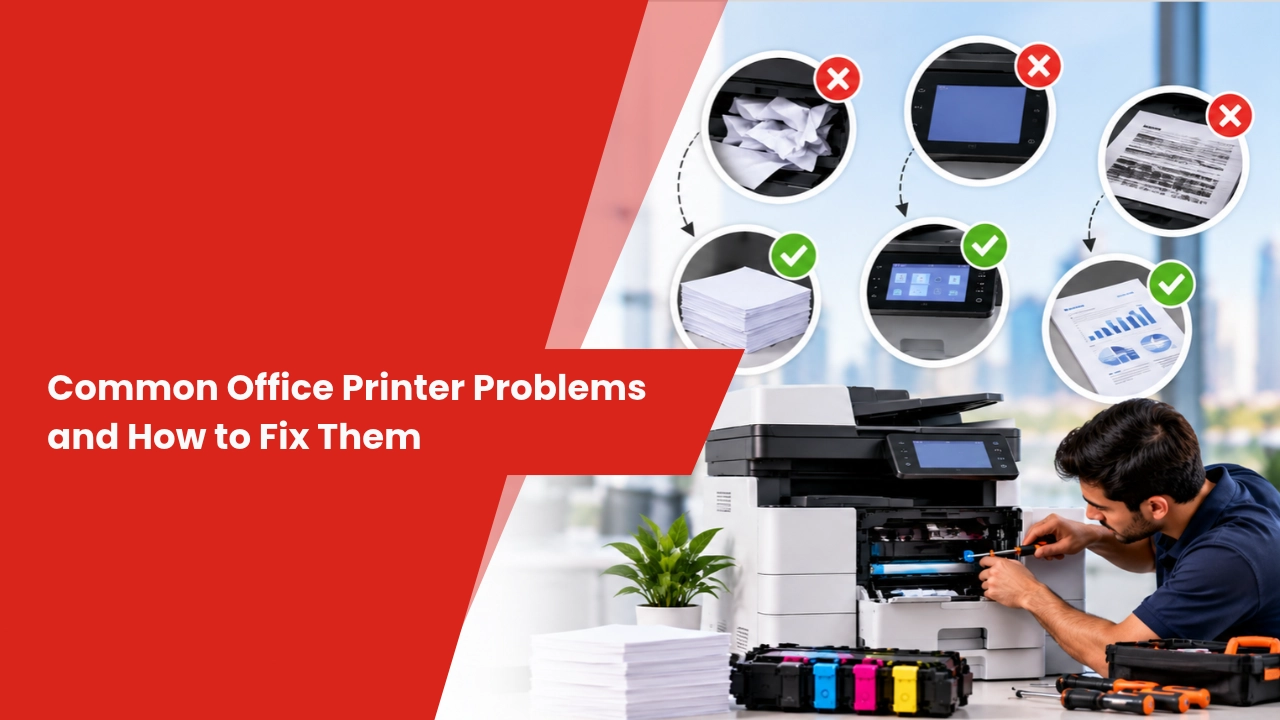
Office printers play an important role in everyday business operations, from printing invoices and contracts to scanning reports and copying documents. However, paper jams, faded prints, connection errors, and slow printing can interrupt workflows and waste supplies.
Understanding common office printer problems and how to fix them helps employees resolve minor issues safely and recognise when professional support is needed. Regular maintenance, correct consumables, and suitable equipment can also help reduce avoidable downtime.
Paper Jams and Paper Feeding Problems
Paper jams can occur when paper is loaded incorrectly, the wrong paper type is used, or feed rollers become worn or dirty. Humidity and damaged paper may also contribute to feeding issues.
How to fix a paper jam:
- Follow the printer’s on-screen instructions or user manual to locate the jam.
- Remove paper gently in the direction recommended by the manufacturer.
- Check the paper tray for folded, damp, or incorrectly loaded sheets.
- Make sure the paper guides fit the paper without squeezing it.
- Inspect the tray and accessible feed areas for remaining scraps.
Avoid pulling paper forcefully or touching hot internal components. If jams continue after these checks, worn rollers or another mechanical issue may require professional inspection.
Poor Print Quality and Faded Documents
Faded text, vertical streaks, spots, and uneven printing can affect the readability of business documents. Common causes include low toner, unsuitable paper, incorrect print settings, or worn imaging components.
How to improve print quality:
Check the toner or ink level and confirm that the selected paper type matches the loaded paper. Print a test page to determine whether the issue affects every document or only a particular file.
For laser printers, follow the manufacturer’s instructions for cleaning or checking the toner and imaging system. For inkjet printers, use the built-in printhead cleaning function when appropriate. Avoid repeatedly running cleaning cycles because they can consume additional ink.
If streaks or faded areas remain, arrange a technical inspection rather than replacing components without identifying the cause.
Printer Offline or Not Connecting to the Network
A printer may appear offline because of Wi-Fi interruptions, loose cables, incorrect network settings, driver problems, or a changed IP address. Shared office printers can also experience connectivity issues when network configurations change.
Troubleshooting steps:
- Confirm that the printer is switched on and displays no critical error.
- Check the Wi-Fi connection or USB and Ethernet cables.
- Verify that the computer and network printer are connected to the correct network.
- Check the computer’s printer queue and clear jobs that are stuck.
- Restart the printer and computer if necessary.
- Check for compatible driver updates from the manufacturer’s official website.
If several employees cannot connect to the same network printer, the issue may involve the office network or printer configuration. IT support can help identify the underlying cause.
Slow Printing and Stuck Print Jobs
Slow printing can result from large files, high-resolution settings, a busy network, insufficient device processing capacity, or an overloaded print queue.
Start by checking whether the delay affects one document or all print jobs. Clear unnecessary queued jobs, use standard print quality for routine internal documents, and avoid sending multiple large files simultaneously where possible.
For offices that regularly print large volumes, compare the printer’s recommended monthly workload and processing capabilities with actual usage. A device that is unsuitable for the workload may need configuration changes or replacement with a more appropriate model.
Printer Error Codes and Unexpected Shutdowns
Error messages can indicate low supplies, open covers, paper feed issues, overheating, or component faults. The correct solution depends on the specific printer model and the displayed code.
Record the exact error message or code and check the manufacturer’s official troubleshooting guidance. Confirm that accessible covers are closed, paper trays are correctly seated, and consumables are installed as instructed.
If the printer repeatedly shuts down, makes unusual noises, smells burnt, or displays a persistent hardware error, stop using it and seek qualified support. Do not open electrical or mechanical components unless the manufacturer explicitly permits the procedure.
Prevent Office Printer Problems with Regular Maintenance
Preventive maintenance helps businesses identify common issues before they cause repeated interruptions. The appropriate schedule depends on the printer model, workload, environment, and manufacturer recommendations.
Useful maintenance practices include:
- Keep the printer and surrounding area free from excessive dust.
- Use suitable paper and compatible consumables.
- Follow the manufacturer’s cleaning and servicing instructions.
- Monitor toner levels, maintenance alerts, and print-quality changes.
- Keep printer drivers and firmware updated where recommended.
- Arrange professional servicing when recurring problems indicate possible wear.
Businesses should also track repeated faults and repair expenses. This information helps them decide whether continued maintenance or replacement is more practical for their particular equipment.
Printer Rental and Maintenance Abu Dhabi
Businesses looking for Printer Rental And Maintenance Abu Dhabi services should consider equipment suitability alongside the availability of technical support. A rental plan may provide access to printers or multifunction photocopiers, with maintenance, toner, or repair services included depending on the agreement.
Before choosing a provider, compare monthly rental charges, printing limits, consumable costs, service response arrangements, and repair coverage. Offices in Abu Dhabi and Mussafah should confirm how breakdown requests are handled and whether on-site servicing is available under the selected plan.
Digital Copier offers printer rental, leasing, maintenance, and Annual Maintenance Contract (AMC) solutions for businesses in Abu Dhabi and across the UAE. Review the individual service terms to understand exactly what is included.
Printer Rental for Offices in Dubai
For companies considering Printer Rental For Offices In Dubai, choosing equipment that matches the office workload can help manage printing requirements without purchasing a device outright.
Small offices may need a compact printer with scanning and copying functions, while larger workplaces may require a higher-capacity multifunction photocopier. Businesses should consider monthly print volume, colour requirements, paper sizes, connectivity, and expected maintenance needs.
Compare rental fees, toner arrangements, print limits, repair coverage, and contract duration before making a decision. A clear agreement helps businesses understand ongoing costs and available technical support.
Digital Copier provides printer rental, leasing, and maintenance options for businesses across Dubai and the wider UAE. Availability and service inclusions depend on the selected plan.
Frequently Asked Questions
What causes the most common office printer problems?
Paper jams, low toner, poor print quality, connectivity errors, and stuck print jobs are common office printer problems. Incorrect paper loading, unsuitable settings, worn components, and network interruptions can all contribute.
Why is my printer printing faded pages?
Faded printing may result from low toner or ink, incorrect print settings, unsuitable paper, or worn imaging components. Check supply levels and print a test page before following the manufacturer’s cleaning and troubleshooting instructions.
How can I fix a printer that shows as offline?
Check the printer’s power and network connection, inspect cables, confirm the correct printer is selected, and clear stuck jobs from the print queue. If multiple users experience the same issue, the network or printer configuration may need attention.
When should an office printer be professionally serviced?
Arrange professional support when paper jams recur, print quality remains poor after basic checks, hardware error codes persist, or the printer makes unusual noises. Electrical faults or signs of overheating require particular caution.
Is printer rental suitable for businesses in the UAE?
Printer rental can suit businesses that prefer not to purchase equipment upfront or need maintenance support through a service agreement. Compare the total rental cost, print limits, consumable charges, and included services before choosing a plan.
Get Reliable Printer Support for Your Business
Recurring printer problems can waste staff time, disrupt document workflows, and increase operating expenses. Basic troubleshooting can resolve some issues, while recurring faults may require professional maintenance or more suitable equipment.
Digital Copier provides printer rental, photocopier leasing, maintenance, and AMC solutions for businesses in Abu Dhabi, Dubai, and across the UAE.
Experiencing recurring printer problems or planning to upgrade your office printing setup? Contact Digital Copier to discuss your equipment requirements, printing volume, and maintenance needs. Request a customised quotation and explore options suited to your business.